
In this article, you will learn the key differences between notify() and notifyAll(), how and when to use them, and see real-world examples demonstrating their behavior.
What is Inter-Thread Communication in Java?
When multiple threads share resources (like objects, files, or databases), they often need to communicate with each other to avoid conflicts and ensure consistency.
For example:
- One thread might be producing data, while another is consuming it.
- The producer should pause when the buffer is full.
- The consumer should pause when the buffer is empty.
Java provides the following methods (from Object class) to manage this communication:
wait(): causes the current thread to wait until it is notified.notify(): wakes up one thread waiting on the object.notifyAll(): wakes up all threads waiting on the object.
Understanding notify() in Java
The notify() method is used to wake up a single thread that is waiting on the monitor of the current object.
Syntax:
synchronized(obj) {
    obj.notify();
}- It must be called from within a synchronized block or method.
- Only one waiting thread is notified — the choice is arbitrary if multiple threads are waiting.
Example: Using notify()
class SharedResource {
    synchronized void waitMethod() {
        try {
            System.out.println(Thread.currentThread().getName() + " is waiting...");
            wait();
            System.out.println(Thread.currentThread().getName() + " resumed");
        } catch (InterruptedException e) {
            e.printStackTrace();
        }
    }

    synchronized void notifyMethod() {
        System.out.println("Notifying one thread...");
        notify(); // Wakes up one waiting thread
    }
}

public class NotifyExample {
    public static void main(String[] args) {
        SharedResource resource = new SharedResource();

        Runnable task = resource::waitMethod;

        Thread t1 = new Thread(task, "Thread-1");
        Thread t2 = new Thread(task, "Thread-2");

        t1.start();
        t2.start();

        try { Thread.sleep(1000); } catch (InterruptedException ignored) {}

        new Thread(resource::notifyMethod).start();
    }
}
✅ Output (sample):
Thread-1 is waiting...
Thread-2 is waiting...
Notifying one thread...
Thread-1 resumed
Only one thread resumes, and the other continues to wait.
Understanding notifyAll() in Java
The notifyAll() method is used to wake up all threads that are waiting on the monitor of the current object.
Syntax:
synchronized(obj) {
    obj.notifyAll();
}- Like
notify(), it must also be called from within a synchronized context. - All waiting threads move from waiting to runnable state.
- Only one thread will get the lock first, but others will also get a chance later.
Example: Using notifyAll()
class SharedResource {
    synchronized void waitMethod() {
        try {
            System.out.println(Thread.currentThread().getName() + " is waiting...");
            wait();
            System.out.println(Thread.currentThread().getName() + " resumed");
        } catch (InterruptedException e) {
            e.printStackTrace();
        }
    }

    synchronized void notifyAllMethod() {
        System.out.println("Notifying all threads...");
        notifyAll(); // Wakes up all waiting threads
    }
}

public class NotifyAllExample {
    public static void main(String[] args) {
        SharedResource resource = new SharedResource();

        Runnable task = resource::waitMethod;

        Thread t1 = new Thread(task, "Thread-1");
        Thread t2 = new Thread(task, "Thread-2");
        Thread t3 = new Thread(task, "Thread-3");

        t1.start();
        t2.start();
        t3.start();

        try { Thread.sleep(1000); } catch (InterruptedException ignored) {}

        new Thread(resource::notifyAllMethod).start();
    }
}
✅ Output (sample):
Thread-1 is waiting...
Thread-2 is waiting...
Thread-3 is waiting...
Notifying all threads...
Thread-1 resumed
Thread-2 resumed
Thread-3 resumed
All waiting threads are resumed one after the other.
📊 Comparison: notify() vs notifyAll()
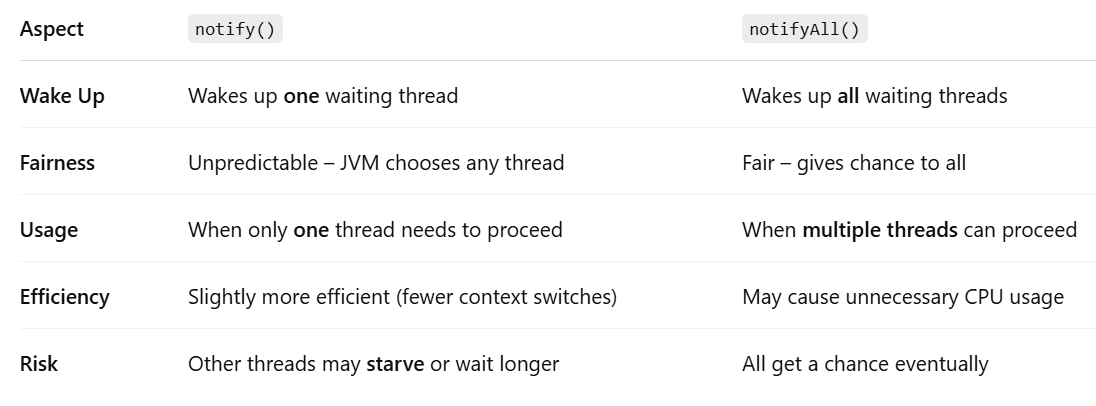
When to Use notify() vs notifyAll()
✅ Use notify() when:
- Only one waiting thread should proceed.
- The other threads must still wait for some condition.
- Example: Single-slot producer-consumer model.
✅ Use notifyAll() when:
- All threads are equally eligible to proceed.
- You don’t know which condition has been met.
- Example: Multiple readers waiting for a file to unlock.
⚠️ Common Mistakes to Avoid
❌ Calling notify() or notifyAll() outside synchronized block:
obj.notify(); // ❌ IllegalMonitorStateException✅ Always wrap it like this:
synchronized(obj) {
    obj.notify(); // ✅ Correct
}
❌ Using notify() when multiple threads are waiting for different conditions:
Imagine several threads are waiting for different resources, but you call notify() — it may wake the wrong one, causing confusion or deadlocks.
✅ Use notifyAll() and let each thread check its condition.
💡 Real-World Analogy
Think of a reception desk with a queue of people:
notify()is like calling one person to the counter.notifyAll()is like calling everyone in the queue, but only one can be served at a time.
So, if only one person is needed (e.g., for a one-on-one task), use notify(). If all may be eligible to proceed, use notifyAll().
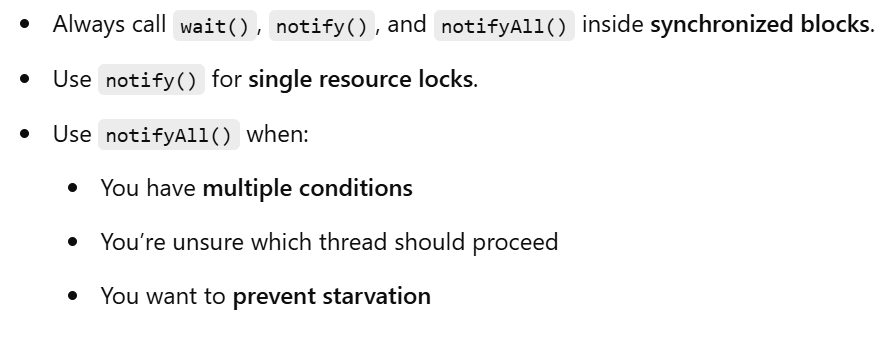
✅ Best Practices
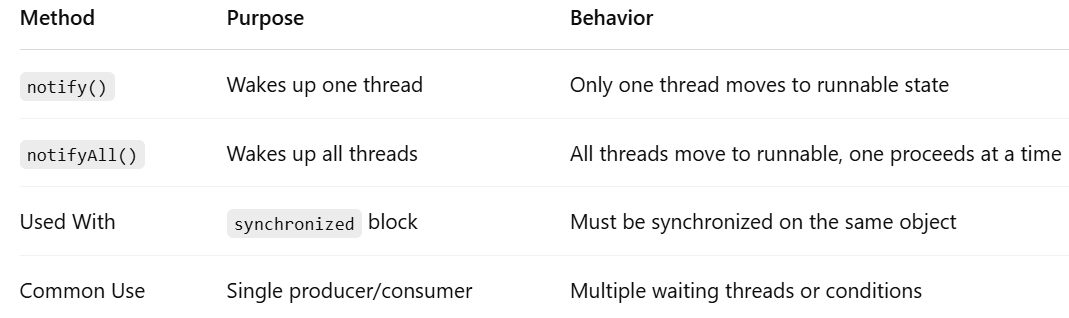
🧾 Summary Table
Final Thoughts
Both notify() and notifyAll() are essential for coordinated thread communication in Java. While they serve similar roles, choosing the right one can improve your program's efficiency, fairness, and correctness.
- Use
notify()when only one thread should continue. - Use
notifyAll()when all waiting threads may be eligible to proceed. - Always wrap them in synchronized blocks, and ensure your waiting conditions are well-defined.
Mastering these methods will make you a more confident and capable Java developer in the world of multithreading and concurrency.
Comments
Post a Comment
Leave Comment