
🎓 Check Out My Top 25 Udemy Courses (80-90% Discount): My Udemy Courses - Ramesh Fadatare
In this quick article, we will learn how to install step by step MongoDB zip version in windows 10.
Refer below screenshot to choose the ZIP version of your package and choose your Operating version similar to the below image:
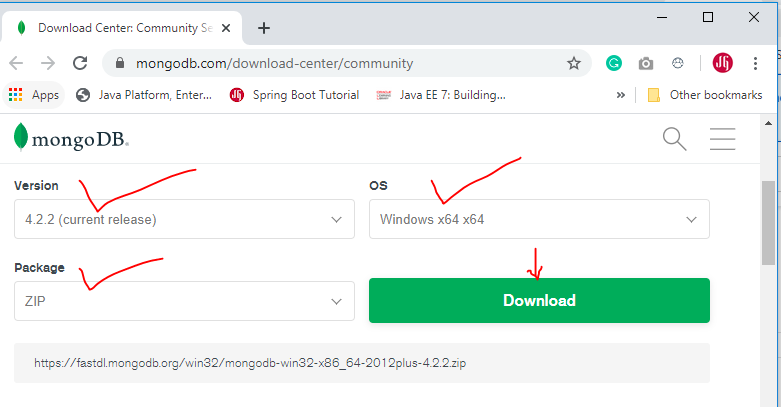 Version: current release
OS: Windows 64-bit
Package: ZIP.
Now click on the Download button and save it into an appropriate location on your computer’s disk.
Navigate to the <MongoDB root directory>/bin folder in the cmd window and execute the mongod.exe file.
For example,
For example,
Video Tutorial
This tutorial explained in below YouTube video:
Step 1: Downloading MongoDB
Download MongoDB server community edition from MongoDB Download Center.Refer below screenshot to choose the ZIP version of your package and choose your Operating version similar to the below image:
OS: Windows 64-bit
Package: ZIP.
Now click on the Download button and save it into an appropriate location on your computer’s disk.
Step 2: Installing MongoDB
Now extract the zip file into a drive, for example, C:\. You can also extract in any location as per your choice or requirements.Step 3: Creating Directory – data\db
Now create a directory called data\db in parallel to the root directory of the MongoDB extracted folder.
The data\db directory is required to save the database records.
Note if you do not create such directory then you will get below error in the console output:
exception in initAndListen: NonExistentPath: Data directory <disk drive of mongodb installation root directory>:\data\db\ not found., terminatingStep 4: Running the MongoDB Server
Let's run the MongoDB server by executing the following command from the cmd window.Navigate to the <MongoDB root directory>/bin folder in the cmd window and execute the mongod.exe file.
For example,
C:\downloads\mongodb-win32-x86_64-2012plus-4.2.1\bin>mongod.exeStep 5: Running MongoDB Client
We want to test whether our MongoDB server is running or not and perform some database operations. So run the mongo.exe file in the bin folder in a cmd window.For example,
C:\downloads\mongodb-win32-x86_64-2012plus-4.2.1\bin>mongo.exeMongoDB shell version v4.2.1
connecting to: mongodb://127.0.0.1:27017/?compressors=disabled&gssapiServiceName=mongodb
Implicit session: session { "id" : UUID("9684d709-821b-4064-9e27-e87f341b1d92") }
MongoDB server version: 4.2.1
Server has startup warnings:
2019-12-22T09:13:59.889+0530 I CONTROL [initandlisten]
2019-12-22T09:13:59.890+0530 I CONTROL [initandlisten] ** WARNING: Access control is not enabled for the database.
2019-12-22T09:13:59.890+0530 I CONTROL [initandlisten] ** Read and write access to data and configuration is unrestricted.
2019-12-22T09:13:59.891+0530 I CONTROL [initandlisten]
2019-12-22T09:13:59.893+0530 I CONTROL [initandlisten] ** WARNING: This server is bound to localhost.
2019-12-22T09:13:59.893+0530 I CONTROL [initandlisten] ** Remote systems will be unable to connect to this server.
2019-12-22T09:13:59.894+0530 I CONTROL [initandlisten] ** Start the server with --bind_ip <address> to specify which IP
2019-12-22T09:13:59.895+0530 I CONTROL [initandlisten] ** addresses it should serve responses from, or with --bind_ip_all to
2019-12-22T09:13:59.895+0530 I CONTROL [initandlisten] ** bind to all interfaces. If this behavior is desired, start the
2019-12-22T09:13:59.896+0530 I CONTROL [initandlisten] ** server with --bind_ip 127.0.0.1 to disable this warning.
2019-12-22T09:13:59.897+0530 I CONTROL [initandlisten]
---
Enable MongoDB's free cloud-based monitoring service, which will then receive and display
metrics about your deployment (disk utilization, CPU, operation statistics, etc).
The monitoring data will be available on a MongoDB website with a unique URL accessible to you
and anyone you share the URL with. MongoDB may use this information to make product
improvements and to suggest MongoDB products and deployment options to you.
To enable free monitoring, run the following command: db.enableFreeMonitoring()
To permanently disable this reminder, run the following command: db.disableFreeMonitoring()
---
> use EmployeeDB
switched to db EmployeeDB
That's all. We have installed MongoDB zip version in windows.
Performing MongoDB Operations
Creating Database
Create a new database by using the below command on the MongoDB client terminal:> use EmployeeDB
switched to db EmployeeDBCheck database
> dbMongoDB Basic Commands
Show All Databases:
show dbsuse databaseNameshow collections;
db.getCollectionNames();db.createCollection("collectionName");// Insert single document
//
db.<collectionName>.insert({field1: "value", field2: "value"})
//
// Insert multiple documents
//
db.<collectionName>.insert([{field1: "value1"}, {field1: "value2"}])
db.<collectionName>.insertMany([{field1: "value1"}, {field1: "value2"}])Save or Update Document:
// Matching document will be updated; In case, no document matching the ID is found, a new document is created
db.<collectionName>.save({"_id": new ObjectId("jhgsdjhgdsf"), field1: "value", field2: "value"});//
// Retrieve all records
//
db.<collectionName>.find();
//
// Retrieve limited number of records; Following command will print 10 results;
//
db.<collectionName>.find().limit(10);
//
// Retrieve records by id
//
db.<collectionName>.find({"_id": ObjectId("someid")});
//
// Retrieve values of specific collection attributes by passing an object having
// attribute names assigned to 1 or 0 based on whether that attribute value needs
// to be included in the output or not, respectively.
//
db.<collectionName>.find({"_id": ObjectId("someid")}, {field1: 1, field2: 1});
db.<collectionName>.find({"_id": ObjectId("someid")}, {field1: 0}); // Exclude field1
//
// Collection count
//
db.<collectionName>.count();Administrative Commands:
//
// Get the collection statistics
//
db.<collectionName>.stats()
db.printCollectionStats()
//
// Latency statistics for read, writes operations including average time taken for reads, writes
// and related umber of operations performed
//
db.<collectionName>.latencyStats()
//
// Get collection size for data and indexes
//
db.<collectionName>.dataSize() // Size of the collection
db.<collectionName>.storageSize() // Total size of document stored in the collection
db.<collectionName>.totalSize() // Total size in bytes for both collection data and indexes
db.<collectionName>.totalIndexSize() // Total size of all indexes in the collection
Comments
Post a Comment
Leave Comment